
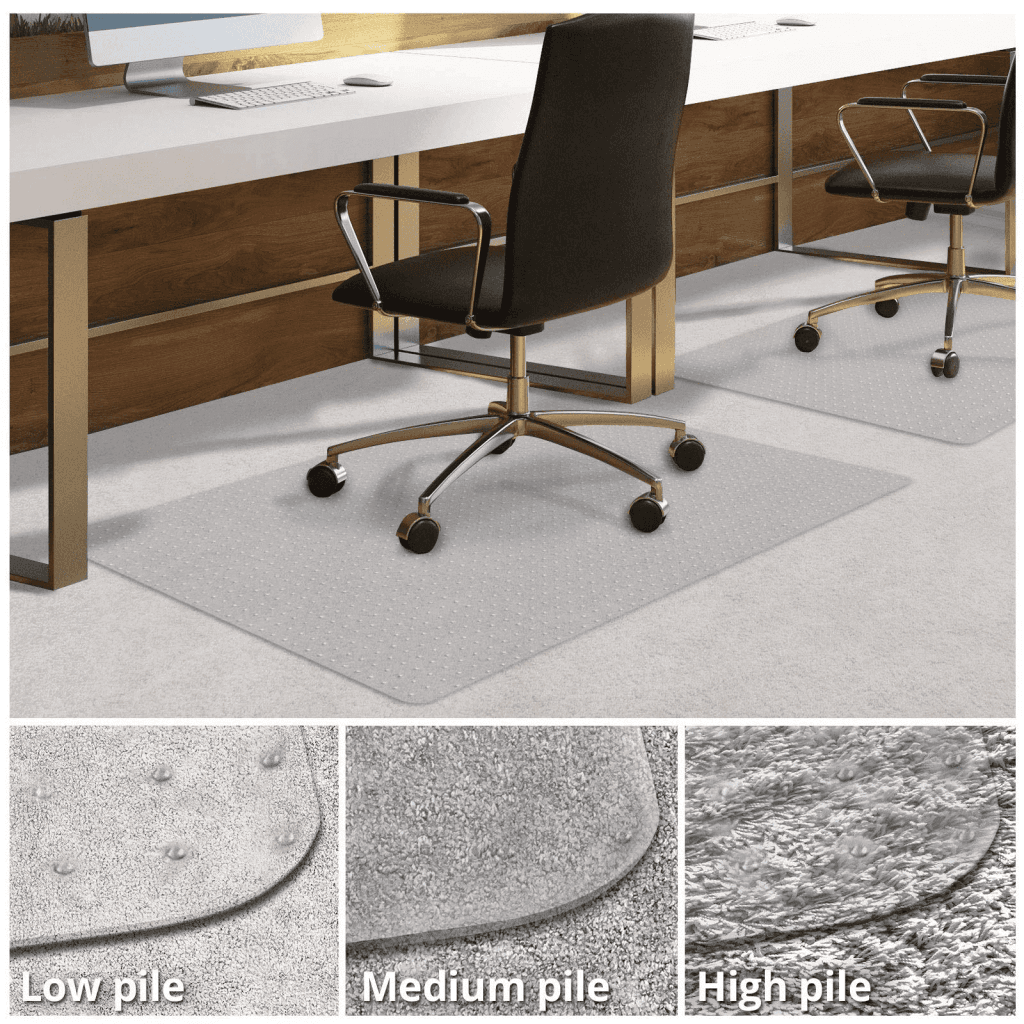
A chair that rolls away every time you stand up - or drifts mid-task on a slick floor - is more than annoying. It breaks posture, interrupts focus, and on a sloped or warped floor it can be an outright tipping risk. Below are seven fixes our occupational therapists actually use with clients, ordered from cheapest to most permanent, with notes on which surfaces each one is best for.
Why office chairs roll in the first place
Before you spend money, diagnose the cause. Most "runaway chair" problems trace to one of four issues:
- Hard, smooth flooring (hardwood, polished concrete, vinyl plank, tile). Standard hard-floor casters are designed to roll on these surfaces - that's a feature, not a defect.
- Uneven or warped floors. Even a 1-2° slope is enough to let a five-caster base creep. You'll usually see the chair drift in the same direction every time.
- Mismatched or worn casters. Soft-tread casters meant for hardwood put on carpet (or vice versa) glide differently than the manufacturer intended.
- Light occupancy. Lighter users put less downward force on the wheels, so the bearings spin more freely. This is why kids' chairs and guest chairs roll more than your own.
The fix you pick should match the cause. A chair mat solves slippery flooring; it won't help a sloped floor. Bell glides solve a sloped floor; they remove the ability to roll at all, which you may not want at your primary desk.
1. Put a chair mat under it
The fastest fix on hard floors. A textured PVC or polycarbonate mat increases friction under the casters and gives them something predictable to grip. Look for:
- Thickness of at least 3 mm - anything thinner curls at the edges and the casters dig in.
- A studded or matte back if you're using it on a low-pile rug, smooth if it's going on a hard floor.
- Rectangular, not "lipped" for typical workstations. The lipped shape is for cubicles where you slide a chair out from under a desk.
A mat protects the floor too, which matters if you're renting.
2. Engage the caster locks
Many modern office chairs - particularly Steelcase Leap, Herman Miller Aeron, and most $300+ task chairs - ship with lockable casters or brake casters. Tip the chair on its side and look for either a small flip lever on the caster, or a ring at the top that you rotate to engage a brake.
If your chair doesn't have them, you can buy aftermarket hooded brake casters that fit the standard 11 mm stem. Two locking casters at the rear is usually enough; you don't need all five.

3. Replace the casters with bell glides
The most permanent fix. Bell glides are stationary feet that snap into the same 11 mm stem socket the casters use. The chair still swivels, but no longer rolls - a good trade if your chair lives at a desk and never needs to move.
Use this when:
- You're on a sloped or warped floor (the AI Overviews "shoe trick" and cardboard wedges are quick versions of the same idea).
- You're sim-racing or using a pedal rig and need the chair locked in place.
- You hate the noise of casters on hardwood.
Don't use this if you actively roll between two screens or a printer stand during the day.
4. Slide caster cups or rubber stoppers under the wheels
Caster cups are small rubber or felt discs that the casters rest in. They cost a few dollars per set of five, and they create a hard pocket the wheel can't roll out of. This is the least invasive option - nothing changes about the chair itself.
A budget version: cut squares of bike inner tube or use heavy rubber shoe heels and rest the rear two casters in those. It's ugly, but it works, and it's the trick Reddit's sim-racing crowd has been using for years.
5. Adjust the seat height (and your weight distribution)
This one is free and surprisingly effective. Raising the seat puts more of your body weight directly over the gas cylinder and onto the casters, which increases the force needed to break the wheels free. Combined with sitting back into the chair rather than perching on the front edge, you can stop a chair from rolling on a level hardwood floor without buying anything.
A common pattern we see in clinic: someone has the chair too low, sits forward to type, and the chair noses backward every time they reach for the keyboard. Raising the seat 2-3 cm fixes it.
6. Park the chair against a wall, desk, or doorstop
A physical backstop is a perfectly legitimate fix, especially for secondary chairs in the room that aren't your primary work seat. Slide the chair so its base is touching the desk pedestal or wall. For a chair that still creeps, a $3 rubber doorstop wedged under one rear caster will stop it dead.
This is also the most reversible fix - useful if you share the chair or move offices often.
7. Buy a compression sit-brake chair (or new casters)
If the chair is the problem - a worn $80 chair, mismatched casters, a cylinder that's worn out - replacing the casters with sit-brake compression casters (sometimes called "self-braking" or "ANSI BIFMA stop-go" casters) is the most polished solution. They roll freely when you stand up, and lock automatically the moment you put weight on the seat. Herman Miller, Steelcase, and Humanscale all sell them as aftermarket parts.
When sit-brakes are the right call: small kids in the house, an elderly user who uses the chair to stand up, or any chair that gets up and stands on its own when you stand.
Quick comparison: which fix for which floor?
- Hardwood / vinyl / tile, level floor: chair mat or caster locks.
- Sloped or warped floor: bell glides or sit-brake casters.
- Low-pile carpet: usually no fix needed - check casters are the soft-tread type before doing anything else.
- Rental, no permanent changes allowed: caster cups or chair mat.
- Sim-racing / pedal rig: bell glides.
- Standing up from the chair (mobility concern): sit-brake casters, full stop.
Frequently asked questions
How do I keep an office chair from rolling so easily?
The fastest fix is putting a textured chair mat or a set of caster cups under the wheels - both add friction without changing the chair. If the floor is sloped, replace the rear two casters with bell glides or buy sit-brake (compression) casters that lock automatically when you sit.
How do I stop my office chair from rotating?
Most task chairs don't ship with a swivel lock, but some Steelcase and Humanscale models do - look for a small lever under the seat near the tilt control. If yours doesn't, the only reliable fix is replacing the gas cylinder with a fixed (non-swivel) cylinder, which a chair-parts vendor can supply for the same stem size.
Is there a way to lock office chair wheels?
Yes. Two options: a built-in caster lock (a flip lever or rotating ring on each caster) on higher-end chairs, or aftermarket hooded brake casters that fit the standard 11 mm stem. You usually only need to lock the two rear casters to keep the chair stationary.
Will a rug stop my office chair from rolling?
A thick, low-pile rug or runner adds friction and works well on hardwood. Avoid high-pile rugs - the casters dig in and you'll wear out both the rug and the bearings. A purpose-built chair mat with a textured top surface is more durable than a rug for daily use.