
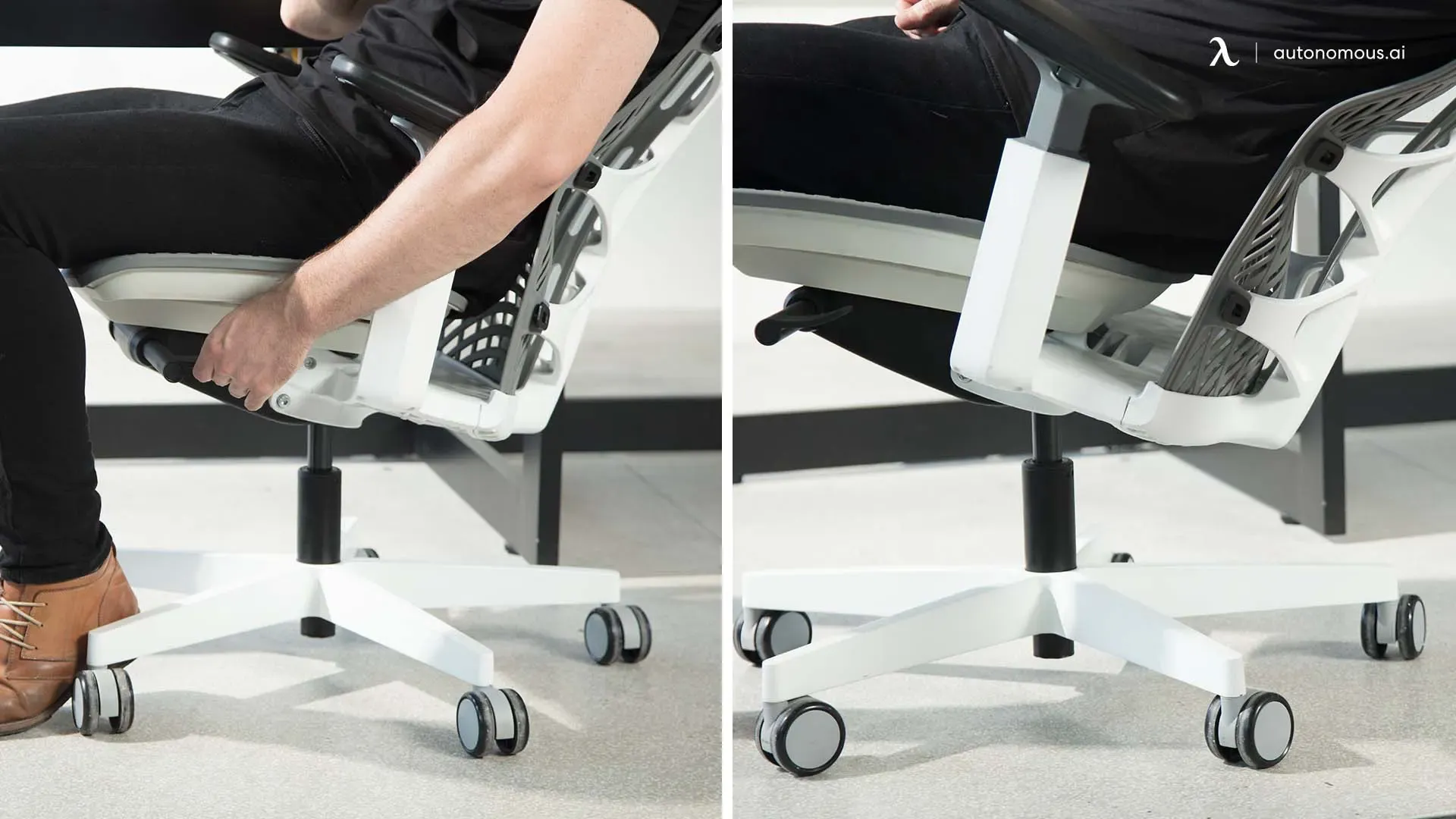
Most office chairs already have everything you need to recline - a tilt lever, a tension knob, and (on better models) a tilt-lock. The reason your chair feels stuck upright is almost always one of three things: the tilt lock is engaged, the tilt tension is cranked too tight, or the mechanism is misidentified. This guide walks through each in order so you can fix it in under two minutes without buying parts.
If your chair refuses to recline at all even after these steps, jump to the troubleshooting section - the most common culprit is a tilt-lock lever you didn't know existed.
What controls recline on an office chair
Reach under the seat. Almost every task chair has two or three controls grouped on the right side of the mechanism housing:
- Pneumatic height lever - paddle on the right, raises/lowers the seat.
- Tilt-lock lever - paddle or knob, usually further back on the right or directly under the seat front. Locks the backrest upright or releases it to recline.
- Tilt-tension knob - a large round knob hanging below the seat, often at the front-center. Controls how much force is required to lean back.
Knowing which is which is half the job. The BTOD guide to recline mechanisms breaks down the five common tilt types - swivel/center tilt, knee tilt, synchro tilt, multi-function, and weight-sensitive - and explains why each one feels different.
Step 1 - Disengage the tilt lock
If your chair was shipped with the backrest bolted upright (most are, for safety in transit), this is why it won't recline.
- Sit in the chair with your feet flat on the floor.
- Find the tilt-lock lever - usually a small paddle on the right side, behind the height lever, or a small knob directly under the seat front.
- Pull it outward (away from the seat) or push it down, depending on the model. Many chairs require slight backward pressure on the backrest while pulling, to release the latch.
- Lean back gently. The backrest should now move.
If nothing happens, the lock isn't the issue - move on.
Step 2 - Loosen the tilt tension
A chair that's "locked" in feel but technically unlocked usually has the tension knob cranked all the way clockwise. Heavier users need more tension; lighter users need less.
- Locate the large circular knob beneath the seat - typically front-center, hanging below the mechanism.
- Turn it counterclockwise to reduce resistance. Start with a few full rotations.
- Test by leaning back. The recline should now feel smoother and easier to initiate.
- If it now leans back too easily and you feel like you'll fall, rotate clockwise one turn at a time until it settles where you want.
Per Boulies' guide, counterclockwise = lighter recline, clockwise = firmer. Match the tension to your body weight, not the previous user's.
Step 3 - Lock your preferred angle (optional)
Many synchro and multi-function chairs let you lock the recline at multiple set angles instead of free-floating.
- Lean back to the angle you want - most ergonomic recommendations land between 100° and 110° for working posture, and 120°+ for reading or calls.
- Push the tilt-lock lever in the opposite direction you pulled it (or rotate the locking knob).
- The backrest now stays at that angle. To free-float again, pull the lever back out.
Avoid locking at fully upright (90°) all day - that posture loads the lumbar spine more than a slight recline does.
Step 4 - Tune the other adjustments while you're down there
Once the recline works, take 60 seconds to fix everything else so the chair actually fits you:
- Seat height: feet flat, thighs parallel to the floor, knees at roughly 90°.
- Seat depth (sliding seat pan, if your chair has one): two to three fingers between the back of your knee and the seat edge.
- Lumbar support: adjust height so the curve fills the small of your back, not the middle.
- Armrests: shoulders relaxed, elbows at ~90°, wrists straight when typing.
- Headrest (if equipped): supports the base of the skull when reclined, not pushing your head forward.
Troubleshooting - chair still won't lean back
If steps 1-3 didn't work, the issue is mechanical, not adjustment. The Back-Shop troubleshooting guide lists the same four root causes our reviewers see most often:
- Tilt-lock lever broken or seized - the lever moves but nothing inside disengages. Common on chairs >5 years old. Replace the mechanism or the chair.
- Tension spring fully bottomed out - knob turns freely with no resistance change. Spring is stripped; mechanism swap required.
- Assembly fault - a screw that should anchor the seat to the mechanism is missing or backed out. Flip the chair and inspect.
- Over weight limit - most office chairs are rated for ~250-300 lb. Over the rating, the mechanism may refuse to tilt as a safety behavior.
For most chairs, a replacement tilt mechanism runs $30-80 and uses standard bolt patterns. Replacing the whole chair is often the right call only if the frame, gas cylinder, or casters are also failing.
Frequently asked questions
Why won't my office chair lean back at all?
In nine cases out of ten the tilt-lock lever is engaged. Reach under the right side of the seat, find a small paddle or knob behind the height lever, and pull it outward (or push it down) while applying light backward pressure on the backrest. If the lock disengages the chair will start to recline. If it still doesn't move, the second-most-common cause is a tilt-tension knob cranked fully clockwise - back it off counterclockwise a few full turns and retest.
What is the tension knob actually doing?
It compresses or releases a spring in the tilt mechanism that determines how much force is needed to start the recline. Clockwise tightens the spring (more force, firmer feel - better for heavier users). Counterclockwise loosens it (less force, easier recline - better for lighter users). It is not a lock; the chair will still recline at either extreme, it just feels stiffer or looser.
What recline angle is ergonomically correct?
Between 100° and 110° from horizontal for active working posture - slight recline reduces lumbar disc pressure compared with sitting straight upright at 90°. For reading, calls, or thinking, 120°+ is fine. Avoid locking the chair fully upright all day; the static load on the lower back is higher than most people realise.
My chair leans back too easily and I feel like I'll fall - how do I fix that?
Tighten the tension knob clockwise one full rotation at a time and retest after each turn. Heavier users typically need the knob most of the way clockwise; lighter users need it most of the way counterclockwise. If maximum tension still feels too loose, the spring inside the mechanism is likely worn out and the tilt assembly needs to be replaced - typically a $30-80 part on standard chairs.
Can I add a recline function to a chair that does not have one?
Not easily. Recline requires a tilt mechanism between the seat and the gas cylinder. A fully fixed chair would need that mechanism retrofitted, which is usually more expensive and more work than buying a chair that already reclines. If yours has a mechanism but the lever is broken, replacing just the mechanism is realistic - most use a standard 4-bolt pattern.