

A bad office chair will show up in your body before it shows up on your calendar. Tight hips after lunch, a hot lower back by 3 p.m., shoulders that creep toward your ears on long calls - most of that is fixable without replacing the chair. The eight adjustments below are the same sequence I walk patients through when they tell me their "chair is killing them." Start at seat height and work outward; you will usually feel the difference within a day.
1. Start with seat height
Chair height is the first domino. With your hips all the way back in the seat, set the height so your feet rest flat on the floor and your knees sit at roughly a 90-degree angle - or slightly below your hips. Thighs should be parallel to the ground, not sloping down toward your knees or pinched up toward your chest.
If you bottom out the gas cylinder and your feet still dangle, add a footrest. Anything stable works - a stack of books, a foam roller - but a purpose-built footrest with a slight tilt will encourage your feet to move during the day, which is good for circulation.
2. Check seat depth before you blame the backrest
A seat pan that is too deep is the most overlooked cause of lower-back pain. If the front edge of the seat presses into the back of your knees, you will instinctively scoot forward - and then you lose your backrest entirely. Slide all the way back and check the gap between the back of your knees and the seat edge: aim for two to three fingers of clearance.
If your chair has a seat-slider adjustment, use it. If it does not, a firm lumbar pillow placed behind your low back effectively shortens the seat depth and pushes you into the right position.
3. Set the backrest angle to 100-110 degrees
A rigid 90-degree posture is not "good posture" - it loads the lumbar discs more than a slight recline. Tilt the backrest back to somewhere between 100 and 110 degrees. You should feel the chair catching the weight of your torso rather than your spinal muscles holding you up.
If your chair has tilt-tension, dial it so the recline meets light resistance instead of flopping back. The goal is small, easy movement throughout the day, not one fixed angle.
4. Dial in lumbar support
The lumbar curve in your low back is what the chair needs to support. If the built-in lumbar pad is too low, too high, or absent, fix it before buying anything else. Adjustable chairs let you raise or lower the lumbar - match it to the deepest part of your spine's inward curve, usually just above the belt line.
For chairs with no lumbar support, a small memory-foam cushion or even a rolled-up towel is enough. The right thickness is the one that lets you sit all the way back without your shoulders rounding forward.
5. Cushion the seat - but match the material to the problem
If the chair feels hard or you notice tailbone soreness, add a seat cushion. Memory foam distributes weight evenly and is good for general padding. Gel cushions handle heat better and are kinder if you run warm. Coccyx cutouts (a U-shape at the back of the cushion) take pressure off the tailbone for anyone with chronic coccyx pain.
Cushions also lift you an inch or two, which helps short users whose chairs do not raise enough to clear a standard 29-inch desk.
6. Position the armrests so your shoulders can fall
Armrests should support your forearms without lifting your shoulders. Sit naturally, let your arms hang, then bend at the elbows to roughly 90 degrees. The armrest should just meet your forearm there - no hunching up, no leaning down to reach it.
If the armrests are fixed and too high, you are better off removing them than fighting them. If they swing in, pull them close enough that your elbows stay near your ribcage instead of flaring out. Padded armrest covers help if the surface is hard plastic.
7. Match your wheels (and floor) to how you move
Worn or wrong-type casters make every position change a small struggle, and that friction will quietly degrade your posture over a week. Hard nylon wheels are designed for carpet; soft polyurethane wheels are designed for hard floors. Using the wrong type leads to either skating or sticking.
A chair mat smooths out movement and protects the floor underneath. If you find yourself bracing against the chair every time you reach for the printer, the wheels - not the chair - are probably the problem.
8. Align the rest of the workstation
A perfectly adjusted chair cannot rescue a misaligned desk. Walk through these once you have the chair dialed in:
- Desk height: Forearms parallel to the floor when you type. If the desk is too tall, raise the chair and use a footrest.
- Monitor: Top of the screen at or slightly below eye level, about an arm's length away.
- Keyboard and mouse: Close enough that your elbows stay near your sides. Wrists straight, not bent up or down.
- Phone or notepad: Whatever you reference most often goes within easy reach, ideally near eye level.
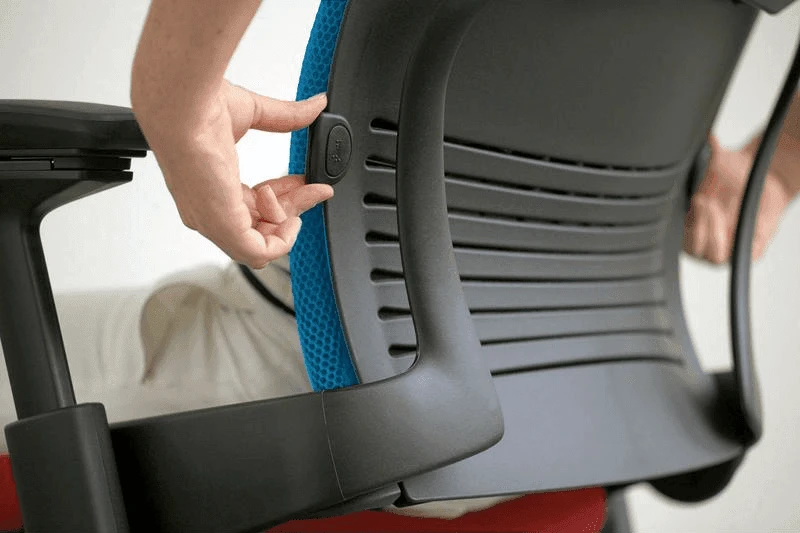
Move every 30 minutes - no chair makes sitting still healthy
The most ergonomic chair on the planet is still a chair. After about 30 minutes, tissues start to compress and circulation slows even in a perfect setup. Set a soft cue - a recurring timer, the end of a calendar block, a refill of your water glass - and stand for two to five minutes.
A sit-stand desk makes this easier because you can switch positions without stopping work. If you do not have one, a short walk to refill a coffee or a few standing stretches at your desk will do the job.
The short version
Most "uncomfortable chair" problems are really setup problems. Get the height right, free your knees from the seat edge, recline slightly, support your lumbar curve, and then handle the workstation around it. If you still feel it in your back a week later, the chair itself is probably the bottleneck - but at least you will know.
Frequently asked questions
How do I make an uncomfortable office chair more comfortable?
Start with the four cheapest fixes: adjust seat height so your feet are flat on the floor, slide your hips all the way back, recline the backrest to 100-110 degrees, and add a lumbar pillow or rolled towel behind your low back. If the chair still feels hard, a memory-foam or gel seat cushion fixes most padding problems for under $50.
Why am I so uncomfortable in my office chair?
Nine times out of ten it is a setup issue, not the chair. Common culprits: the seat is too deep so you sit on the edge, the backrest is locked at 90 degrees, the armrests are too high and lifting your shoulders, or the desk is forcing your arms upward. Run through the eight adjustments in this guide before assuming you need a new chair.
What angle should an office chair be at?
Backrest between 100 and 110 degrees, seat roughly parallel to the floor, knees at 90 degrees or slightly below the hips, and elbows at 90 degrees when your forearms rest on the desk. A small forward tilt of the seat can help if you have hip-flexor tightness, but a neutral or very slight backward tilt suits most people.
How often should I get up from my office chair?
Every 20 to 30 minutes, even if only for two to five minutes. Tissue compression and reduced circulation start within that window regardless of how good your chair is. A sit-stand desk makes the switch frictionless; if you do not have one, tie standing to existing cues like calendar transitions or water refills.