
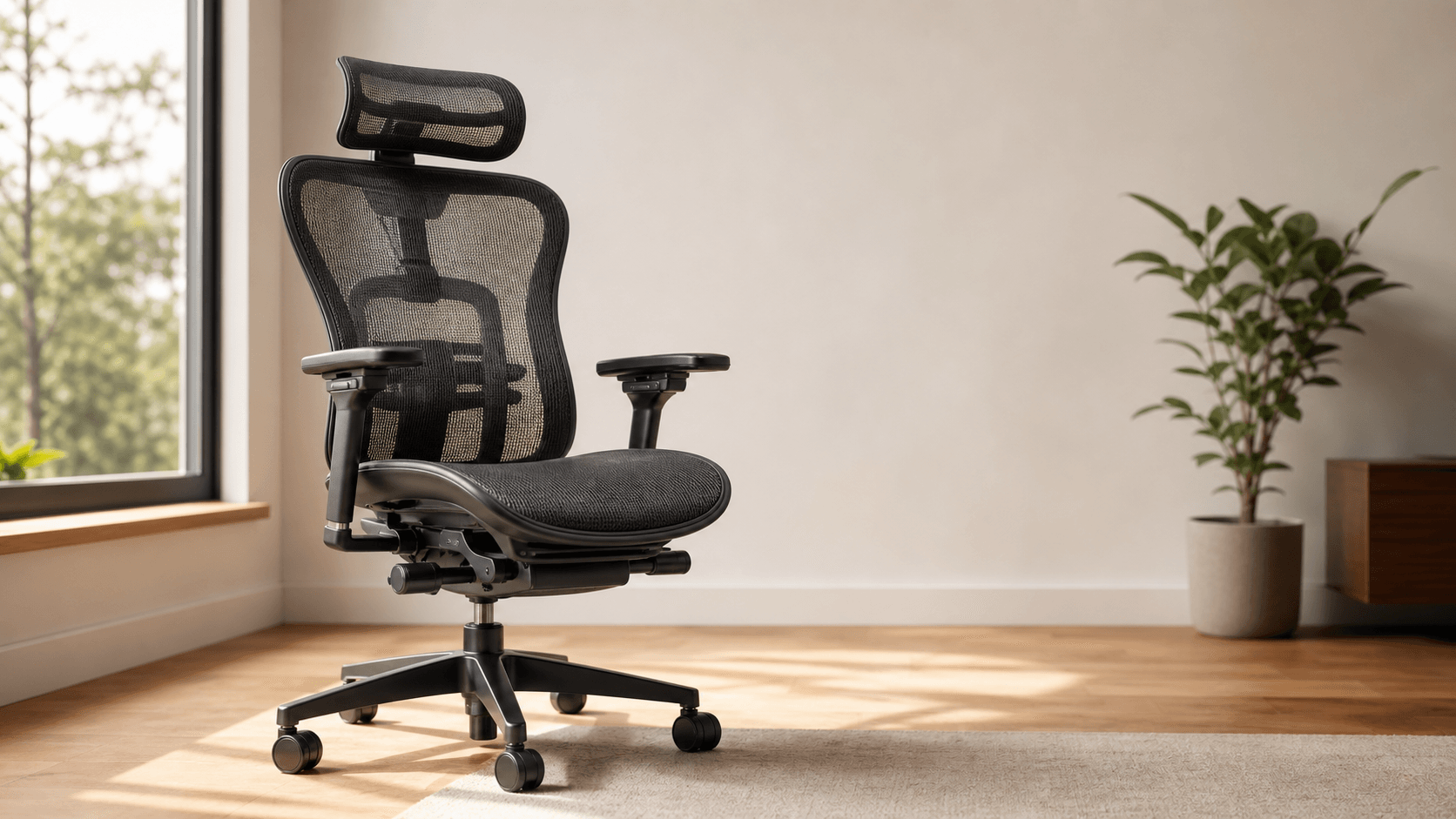
An ergonomic office chair is a seat engineered to support your spine's natural S-curve and adjust to your body, so that hours of seated work cause less strain on your back, neck, shoulders, and hips. The defining feature is not "comfort" - it's adjustability: a chair only counts as ergonomic if you can change it to fit you, not the other way around.
If you sit for more than four hours a day at a desk, the chair is the single piece of equipment most likely to cause - or prevent - chronic discomfort. The rest of this guide explains what specifically separates an ergonomic chair from a standard office chair, the features that matter, the trade-offs, and how to pick one without getting buried in marketing claims.
The short definition
An ergonomic chair is designed around the principle of a neutral posture - joints aligned in their natural resting position so muscles, tendons, and ligaments are not loaded asymmetrically. Practically, that translates to a chair that lets you:
- Sit with feet flat on the floor and knees at roughly a 90° angle
- Keep your forearms parallel to the desk with elbows at ~90°
- Rest your lower back against firm support that follows the curve of your lumbar spine
- Change positions throughout the day without the chair fighting you
A chair that nails all four for you specifically is ergonomic. A chair that nails them for the showroom mannequin but not for you is just a chair with marketing copy. This is why adjustability - not foam thickness or premium leather - is the test.
Ergonomic vs. standard office chair
The difference is not cosmetic. Standard task chairs typically offer one or two adjustments - pneumatic seat height and sometimes a tilt-tension knob. An ergonomic chair stacks five to nine independent adjustments that work together:
- Seat height - to land your feet flat
- Seat depth (pan slider) - to leave a 0.5-1 inch gap behind your knees
- Lumbar support (height + depth/firmness) - to match where your lower-back curve actually is
- Backrest recline + lock - to support more than one sitting posture
- Armrests (4D: height, width, depth, pivot) - to keep shoulders relaxed
- Headrest (on tall-back models) - for occasional reclined work
The Pittsburgh EH&S office's chair-selection guide recommends testing a chair for 60-120 minutes before judging the seat pan - most discomfort doesn't show up in the first five minutes, which is why showroom test-sits are misleading.
The features that actually matter
These are the components a chair needs to be functionally ergonomic. Skip any of them and you're back to a fancy task chair.
1. Adjustable lumbar support
The lumbar region carries roughly 100% of your upper-body weight when seated. Quality ergonomic chairs let you adjust both the height (so the support hits your actual curve, not someone else's) and the firmness or depth (so it presses with the right pressure). Adaptive systems like Herman Miller's PostureFit and Steelcase's LiveBack flex to track your spine as you move; static lumbar pads are the budget alternative and work if they can be height-adjusted.
2. Seat pan: height and depth
Seat height is the entry-level adjustment - every office chair has it. Seat depth (a sliding pan that moves the cushion forward or back relative to the backrest) is the one most cheap chairs skip and most ergonomists prioritize. Without it, taller users either lose thigh support or shorter users get a hard edge cutting into the back of their knees. Look for a 2-3 inch slider range and an unobtrusive lever to adjust it.
3. Armrests - 3D or 4D
A static armrest is almost worse than no armrest, because it forces you to either shrug or splay. The minimum useful adjustment is 3D: height, width, and depth. 4D adds pivot, which matters for keyboard work where your forearms angle inward. Armrest height should let your elbows hang at ~90° with shoulders relaxed.
4. Backrest tilt and recline
A neutral 90° seated posture is healthy in short doses. Sustained upright sitting is just as fatiguing as sustained slouching - your spine is built for movement. Look for a tilt lock with at least three positions (upright work, mid-recline reading, deeper recline for phone calls) and a tension knob so heavier and lighter users can both rock the chair without pushing through molasses or falling backward.
5. Five-pedestal base + smooth casters
The five-point base is the safety floor - anything less is tip-over prone. Casters should match your floor: hard rollerblade-style for carpet, softer urethane for hardwood and tile. Wrong casters mark up floors fast.
6. BIFMA-certified build
BIFMA is the furniture industry's mechanical-durability spec. A BIFMA-rated chair has been load-tested to specific cycle counts on the seat, back, and arms. It's not a magic certification, but the absence of it on chairs priced above $300 is a yellow flag - most reputable brands list it on the spec sheet.
What ergonomic chairs do not do
Marketing language oversells. A few honest disclaimers:
- They don't fix bad posture by themselves. A chair that adjusts well still requires you to set it up correctly and to get up and move periodically. The Herman Miller research summary cites Dowell et al. (2001): seated people change torso position an average of 53 times per hour - chairs that support that movement, not chairs that immobilize you, are what matter.
- They don't cure pre-existing back pain. They can reduce the load that contributes to it. Persistent pain warrants a clinician, not a chair upgrade.
- They don't last forever just because they're expensive. Foam compresses, cylinders leak, mesh stretches. Premium chairs come with 10-12-year warranties; mid-range chairs typically come with 2-5 years. Match the warranty to how long you actually expect to use the chair daily.

How to set one up
A good ergonomic chair, badly set up, is worse than a basic chair set up correctly. The sequence:
- Seat height: feet flat on the floor (or footrest), knees at ~90°, thighs roughly parallel to the floor.
- Seat depth: slide the pan so there's a 0.5-1 inch gap between the front of the seat and the back of your knees.
- Backrest height (if adjustable): position the lumbar support against the small of your back.
- Backrest tilt tension: heavier users firmer, lighter users looser. The chair should reward you for leaning back, not punish you.
- Armrests: drop or raise until your shoulders hang relaxed and forearms are level with the desk surface.
Re-check the setup every few months. Lumbar curves shift with weight changes, pregnancy, injuries, and posture habits.
Trade-offs to expect
- Cost. A genuinely ergonomic chair starts around $300 (entry mid-range) and tops out above $1,500 for chairs like the Herman Miller Aeron. The premium is for the engineering, not the upholstery.
- Adjustment learning curve. First-time users often over-tilt or set lumbar too high. Plan to spend 1-2 weeks tweaking before settling.
- Aesthetic constraint. Most fully ergonomic chairs look like office chairs, not living-room furniture. Hidden-mechanism executive chairs (the "leather throne" category) usually trade adjustments for looks - fine for occasional desk work, poor for full-time use.
When a standard task chair is enough
Not everyone needs a $700 chair. If you sit for under three hours a day, switch between desk and other workstations frequently, or share the chair with several people who never adjust it anyway, a well-built standard task chair (height + tilt + basic lumbar) is honest value. The expensive ergonomics deliver their ROI on long sustained sits, not on quick desk visits.
Bottom line
An ergonomic office chair is a chair that adjusts to you - that's the entire definition compressed to one sentence. Features like 4D armrests, adjustable lumbar height, seat-depth sliders, and a five-point base aren't marketing flourishes; each one addresses a specific way your body loads the chair across an eight-hour day. Pick the cheapest chair that hits all of them. Skip the leather, skip the cooled gel pad, skip the "executive" label. The chair that fits your spine is the one that helps your back.

Common questions
Is an ergonomic chair the same as an office chair?
No. All ergonomic chairs are office chairs, but most office chairs are not ergonomic. A standard task chair usually offers one or two adjustments (seat height and sometimes tilt tension). An ergonomic chair adds adjustable lumbar support, seat depth, multi-axis armrests, and a tilt-lock system - five to nine adjustments that work together to fit the chair to your body.
Do ergonomic chairs actually prevent back pain?
They reduce the load that contributes to it, but they do not cure pre-existing back pain on their own. A well-set-up ergonomic chair lowers the mechanical strain across an 8-hour day, especially in the lumbar spine and shoulders. Persistent pain still warrants a clinician's input - not a chair upgrade.
How much should I spend on an ergonomic chair?
Genuinely ergonomic chairs start around $300 (entry mid-range) and top out above $1,500 for chairs like the Herman Miller Aeron. Under $300, you're usually paying for cosmetic upgrades on a basic task chair. Match the warranty to your daily use - premium chairs come with 10-12 years; mid-range with 2-5.
What are the most important features in an ergonomic chair?
Adjustable lumbar support (height and firmness), a seat-depth slider, 3D or 4D armrests, a backrest with multi-position tilt-lock and tension adjustment, a five-pedestal base, and BIFMA certification. If a chair is missing more than one of those, it is not functionally ergonomic regardless of how it markets itself.
How long should I sit-test a chair before deciding?
The Pittsburgh EH&S office's chair-selection guide recommends 60-120 minutes. Most seat-pan discomfort doesn't show up in the first five minutes, which is why showroom test-sits are unreliable - order from a retailer with a real trial period (typically 30 days for office furniture) so you can evaluate over multiple workdays.